Family tree template for a blended family
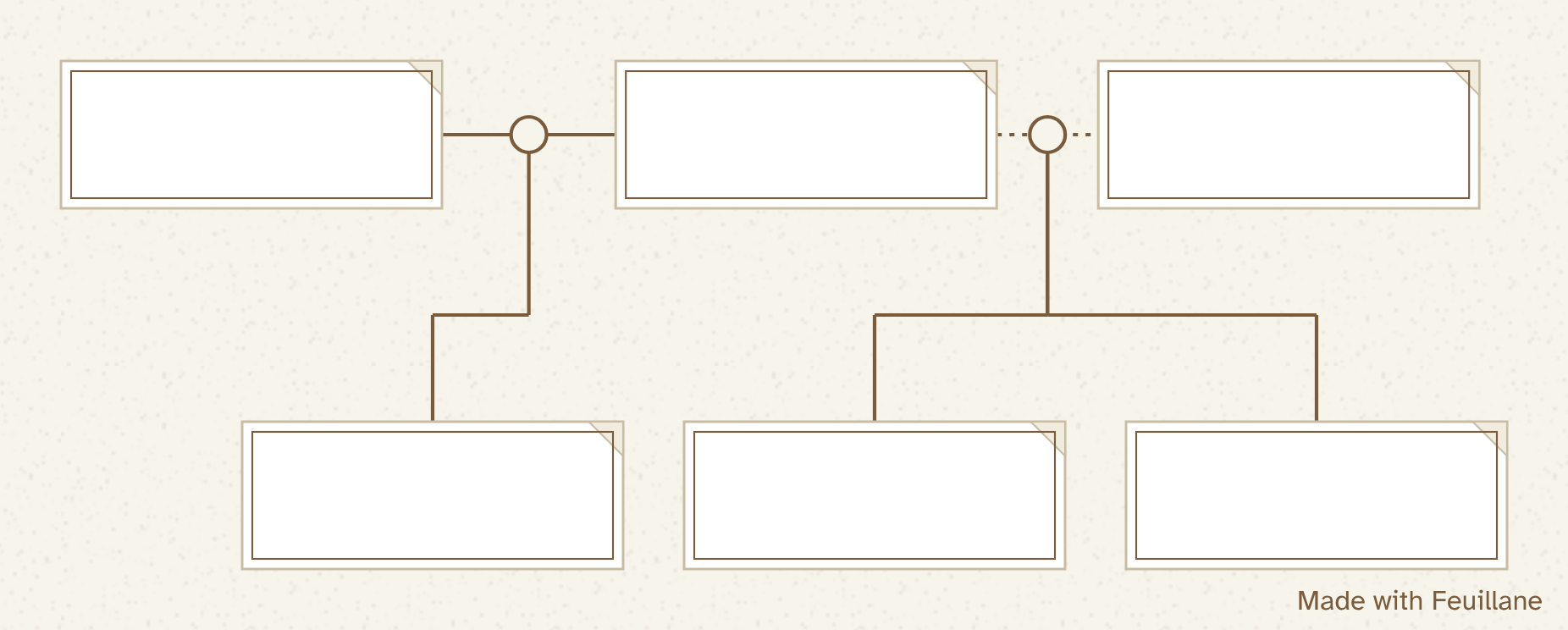
A family tree template for blended families: separation, stepparent, half-brothers and half-sisters. Blank PDF in A4 or US Letter, PNG, and an online version that lays itself out.
Your template is downloading. You can also fill it in on screen: it prints cleanly, and you can get it as a poster. Fill it in on screen

Free, no sign-up. “Fill in online” opens the same template in the editor: you type the names, the tree lays itself out, and your data stays in your browser.

Why standard templates get stuck
An ordinary family tree template has a “father” box, a “mother” box and a single line between them. As soon as a couple splits up and one of them finds a new partner, you're short a box and a line. You cross things out, stick on a sticky note, or end up leaving someone off so everything fits. Yet a blended family is nothing unusual. It's a family, and its tree should show it as it is.
What this template shows
The blank template covers the most common situation: one parent who has had two partners, one after the other. In the middle sits the shared parent. On one side, the first partner, joined by a dotted line (the couple has separated), with their two children below. On the other side, the new partner, joined by a solid line, and the child born to that couple. At a glance you can see who are full brothers and sisters, and who are half-siblings.
Conventions that work
- Each parent keeps their own box, whatever happens. A separation doesn't change who a child's parents are.
- Each couple gets its own line. Someone who has had two partners simply has two lines, one on each side.
- A couple that ended is shown with a dotted line, with its years: “2008 to 2016.”
- The stepparent goes next to the parent they live with, never in the other parent's place.
- Every child comes down from the line joining their two parents. That one rule is what makes half-siblings easy to read.
- Adoption is marked with a dashed line: the child is fully part of the sibling group, and only the kind of link is noted.
Half-siblings and stepsiblings
The two get mixed up all the time. Half-siblings share one parent: a half-brother is the son of your father or your mother with someone else. Stepsiblings share no parent at all: they're the children your parent's new partner had before. On the tree, a half-sibling comes down from a couple that includes your parent; a stepsibling comes down from a couple that doesn't.
Adapting the paper template to your family
Your family doesn't look exactly like the template? Almost none do. If it's the parent on the other side who has a new partner, just flip the layout: the new partner goes on their side. If there are two children from the second couple, write them on the same row, joined to the same line. If both parents have new partners, you need one more box at each end, and paper runs out of room fast.
That's where the online editor comes in handy. The “Fill in online” button opens this same template. Add a couple, attach a child to the right parents, and the tree lays itself out again with no overlap. Put a child under the wrong couple? Fixing it takes two clicks. Then print it on one page, just like a paper template.
What about the grandparents?
This template focuses on the blended household. To add grandparents on both sides, start from the 4-generation template and pencil in the new partners, or build the whole tree in the editor, which has no limit on the number of couples or generations.
Teaching this in class? The teacher kit includes a blended family worksheet ready to photocopy, and a draw-your-own sheet for the students whose family fits no template.
How to fill in a blended family tree
- Write in the child's two parents. Side by side, joined by their line, even if they have separated.
- Add the new partner. Next to the parent concerned, with a line of their own.
- Hang each child from the right couple. Children of the first couple under the first line, those of the second under the second.
- Note the years of each couple. “2008 – 2016” on a line already says the couple split up.
- Or fill it in online. Click “Fill in online”: the same template opens in the editor, you type the names, and it prints cleanly.
Frequently asked questions
Where does a stepparent go on a family tree?
Next to the parent they live with, joined by a line of their own. A stepparent never takes the place of the other parent.
Where do half-siblings go?
On the same row as the other brothers and sisters, but under the couple formed by their own two parents. That separate line shows they share only one parent.
What's the difference between a half-sibling and a stepsibling?
Half-siblings share one parent. Stepsiblings share none: they are the children of your parent's new partner.
The paper template doesn't match my family. What can I do?
Open it in the online editor. Add the partners and children that are missing, and the tree rearranges itself. Then print it like a paper template.
PDF or PNG: which one should I download?
The PDF is laid out on an A4 or US Letter sheet with margins, so it prints at actual size. The PNG is a high-resolution image, handy for printing from a phone or dropping into a document.